3. What should actually go into a small-business content calendar?
You do not need twenty fields for every post.
The right amount of information is enough to make the next action obvious.
Publication date
When should the content go live?
This gives the rest of the workflow a deadline.
Channel
Where will it be published?
For example:
- Facebook,
- Instagram,
- LinkedIn,
- your website,
- email,
- or another channel relevant to the business.
One idea may be used across more than one channel, but the format or copy may need to change.
Content topic
What is the post actually about?
A clear topic prevents vague entries such as “social post Tuesday” that still require someone to invent the idea later.
Content type
It can help to distinguish between:
- educational content,
- service promotion,
- product content,
- customer proof,
- announcements,
- seasonal content,
- articles,
- offers,
- or other recurring formats.
This makes it easier to see whether the calendar has become too repetitive.
Status
Is the content:
- planned,
- being created,
- waiting for approval,
- approved,
- scheduled,
- or published?
This becomes increasingly useful when more than one person is involved.
Supporting work
Does anything else need to happen before this content goes live?
Perhaps the website needs an update.
Perhaps a new graphic needs to be created.
Perhaps a product needs to be added.
Perhaps a landing page needs to be checked.
This is where a content calendar becomes more than a list of social posts.
It starts connecting marketing tasks together.
4. How far ahead should a small business plan content?
There is no single planning period that works for every business.
Planning too little creates last-minute pressure.
Planning too far ahead can make the calendar rigid.
A practical approach is to plan far enough ahead that the business has time to prepare properly while leaving room for genuine current events, changes and opportunities.
For some businesses, one week ahead may be enough to establish consistency.
For businesses publishing more regularly, a month gives a clearer view of campaigns, recurring topics and upcoming dates.
The important part is not whether the calendar displays seven days or thirty.
The important part is that the business can see what is coming before it needs to create it.
5. A content calendar is not the same thing as a scheduler
This distinction matters.
A content calendar helps you plan the work.
A scheduler publishes content at a chosen time.
Those functions can exist in the same tool, but they solve different problems.
You can have perfectly scheduled content that was badly planned.
You can also have a strong content plan that still requires someone to publish each item manually.
Planning comes first.
You need to know what should go out before automation becomes useful.
For teams, there is another layer: approval.
A post may need to move from idea to design, then to review, then to approval, and only after that to scheduling.
The more people involved, the more valuable it becomes to see those stages instead of coordinating them through separate messages.
6. What tool can a small business use to plan content?
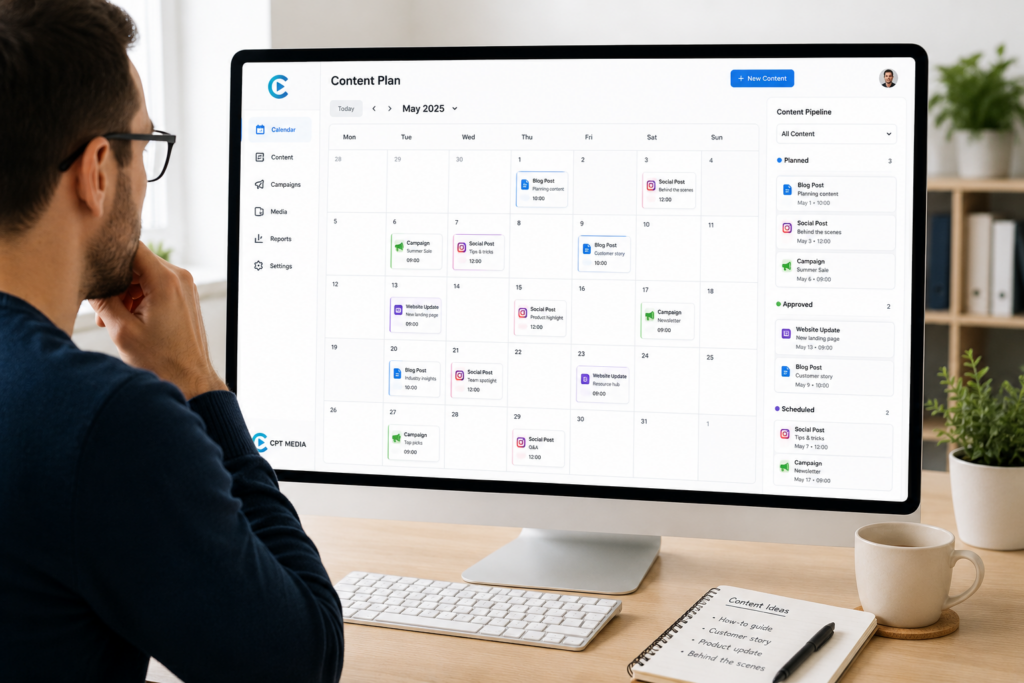
The Content Calendar inside the CPT Media Dashboard is built around this problem.
The CPT Media Dashboard is a marketing dashboard for small businesses that connects four areas of routine marketing:
- Design Studio for creating branded graphics,
- Website Content (CMS) for routine website updates,
- Content Calendar for planning what goes out and when,
- and Plain-English Analytics for understanding performance.
The Content Calendar gives the business a planning space inside the same system being used for its other marketing tasks.
CPT Media’s current plans expand that planning capability according to how much the business needs: Starter supports planning one week ahead, Business extends that to a full month, and Marketing Pro adds multi-post approvals and full scheduling. See the CPT Media Dashboard features and plans
That distinction is useful because a solo operator planning a few pieces of content does not necessarily need the same workflow as a team managing approvals and a larger publishing schedule.
7. Why the calendar works better when it is connected to content creation
A calendar on its own can still become another place where ideas sit.
The value increases when the planned content connects to the work required to produce it.
In the first article in this series, How to Create Branded Social Media Posts Without a Designer, we looked at using reusable branded templates instead of starting every routine graphic from a blank canvas.
The relationship is straightforward:
The Content Calendar tells you what needs to be created.
The Design Studio gives you a controlled way to create the visual.
That changes the workflow from:
“We should probably post something today.”
to:
“Thursday’s service post is already planned, so we know what graphic needs to be prepared.”
The creative task has a reason and a deadline before someone opens the design tool.
8. Why the calendar should also connect to your website
Not every marketing activity ends on social media.
A post often points somewhere.
That may be:
- a service page,
- a product page,
- a blog article,
- a contact page,
- a landing page,
- or another part of the website.
If the supporting website content is wrong, the campaign is only half ready.
In the previous article, How to Update Your Website Without a Developer, we separated routine content updates from actual development work.
That same distinction matters here.
Suppose the calendar shows a new service campaign going live next Wednesday.
Because the campaign is visible in advance, the business can see that the service page also needs updating before Wednesday.
The calendar is therefore not simply telling you when to post.
It is exposing the work that needs to happen around the post.
That is a much more useful way to plan marketing.
9. A simple monthly content calendar example
Imagine a small service business planning the next four weeks.
Week 1: Educational content
The business plans a useful tip related to one of its services.
The Design Studio is used to prepare the branded graphic.
The post links to an existing service page.
A particular service is being promoted.
The calendar shows that the website description needs updating before the campaign starts.
The CMS update becomes part of the preparation.
Week 3: Customer proof
A testimonial or completed-project story is planned.
The content is prepared in advance instead of being assembled on the day.
Week 4: Article or useful resource
A longer article is published on the website.
Supporting social content is planned around the article so the website and social channels are working together.
The calendar now gives the business a visible rhythm.
It can also reveal problems.
If every entry is a sales promotion, that becomes obvious.
If three campaigns are scheduled in the same week and nothing is planned for the next two, that becomes obvious too.
Visibility makes adjustment easier.
10. What makes a content calendar useful instead of becoming admin?
A content calendar fails when maintaining the calendar becomes more work than creating the content.
The system should therefore stay practical.
Only track information that helps someone make a decision or complete the next action.
If nobody needs a field, remove it.
If every post requires ten status updates but only one person works on the content, the process is probably too complicated.
If a team requires approval before something can go live, then an approval status is useful.
The calendar should fit the business.
The business should not have to reorganise itself around the calendar.
11. Can a content calendar improve consistency?
A calendar can make consistency easier because it gives the business visibility of upcoming gaps.
It does not automatically make the content good.
It also does not guarantee that posting more often will produce better results.
What it can do is remove one common reason for inconsistency:
waiting until the day of publication to decide what to publish.
That gives the business more time to prepare useful content, coordinate graphics, make website changes and review the message before it goes live.
Consistency becomes a workflow rather than a reminder.
12. Planning is only useful if you eventually measure what happened
This is where the third part of the CPT Media Dashboard leads naturally into the fourth.
So far, the workflow looks like this:
Design Studio → Create
Website Content → Update
Content Calendar → Plan
Now the content is being created intentionally.
The website is being kept aligned.
The business knows what is going out and when.
But there is still an important question:
What actually happened after you published it?
A full calendar can make a business look organised while still telling you nothing about whether people visited the website, which pages attracted attention or what content is worth improving.
That is why planning cannot be the end of the cycle.
The next step is measurement.
13. The Content Calendar is the “Plan” part of the system
A content calendar for small business should make marketing easier to see, not harder to manage.
The CPT Media Dashboard connects that planning stage to the work on either side of it:
Create → Update → Plan → Measure → Improve
You create the content.
You make sure the website supports it.
You plan when everything needs to happen.
Then you measure the result.
That final step is important because good planning is not about filling every square on a calendar.
It is about learning what deserves to go onto the next one.
Next in this series:
How to Understand Your Website Analytics Without the Overwhelm